



Highlights
- Stockouts cost more than missed sales. They destroy the ranking equity, keyword positions, and conversion history that months of ad spend were used to build.
- 48% of Amazon products experienced a stockout in a recent study of 524 products; globally, retailers lose an estimated $984 billion annually to out-of-stock situations.
- A single 10-day stockout on one mid-volume SKU can cost nearly $19,000 when you account for direct margin loss, PPC recovery spend, and customer churn — the full formula breakdown is inside.
- Amazon’s A9/A10 algorithm penalises out-of-stock listings within 48 hours; full ranking recovery can take anywhere from 3 days to 6 months depending on how long the stockout lasted.
- Amazon’s Low-Inventory-Level Fee (introduced in April 2024) means sellers start paying a penalty before they even hit zero, once Days of Supply drops below 28 days.
- Most stockouts at scale are a cash flow timing problem. CrediLinq provides ecommerce sellers with flexible credit lines up to $2M, approved in under one business day based on real store performance data, so your reorder point triggers a purchase order, not a cash flow crisis.
Why this matters to you
- Every day your listing sits out of stock, Amazon’s algorithm is quietly reassigning your hard-earned ranking to a competitor, and it won’t hand it back the moment you restock.
- At seven figures in revenue, a single stockout on one SKU can silently erase weeks of ad spend, organic momentum, and customer loyalty in ways that don’t show up on a dashboard until it’s too late.
- If you’ve ever restocked and wondered why sales didn’t bounce back the way you expected, this is why, and there’s a smarter way to make sure it doesn’t happen again.
Running out of stock feels like a temporary setback. A few days down, restock, move on. But for sellers doing seven figures or more across Amazon, TikTok Shop, Walmart, or eBay, an Amazon FBA out of stock event is rarely a minor blip. It’s a ranking emergency with a compounding bill that keeps arriving long after your inventory is back online.
Even after you restock, your organic position, your Buy Box, your conversion history, your ad efficiency, all of it degrades during a stockout and takes weeks, sometimes months, to rebuild.
This guide breaks down exactly what a stockout costs at scale, how the algorithm penalises you, how long recovery actually takes, and what formulas and strategies high-volume sellers use to protect the ranking value they’ve worked so hard to build.
Why Stockouts Hit $1M+ Sellers Differently
At lower revenue levels, a stockout hurts because you lose a few days of sales. At seven figures and above, it destroys something harder to quantify: ranking equity. That’s the accumulated organic visibility, keyword positions, and conversion history that took months and significant ad spend to build — and that drives the majority of your revenue even when you’re not running ads.
According to a 2024 analysis by 8fig covering 524 products across 169 Amazon and Shopify sellers, 48% of Amazon products experienced a stockout during the study period.
The financial stakes are enormous: retailers globally lose an estimated $984 billion annually due to out-of-stock situations, with North America alone accounting for $144.9 billion in missed sales.
For individual sellers, poor inventory management can cost up to 11% of annual revenue through lost sales, emergency shipping, inflated ad costs, and depressed organic momentum.
For a seller doing $2M per year, that’s a potential $220,000 left on the table, not from bad products or poor marketing, but from running out of stock at the wrong time.
What Actually Happens When You Go Out of Stock
Most sellers think about a stockout in terms of days. Amazon’s algorithm thinks about it in terms of signals, and every signal it receives the moment your inventory hits zero is negative. Here’s the chain reaction:
Hour 0–48: Your sales velocity drops to zero. Amazon’s A9/A10 algorithm, which uses sales velocity as a primary ranking signal, registers your listing as unreliable. You can lose hundreds or even thousands of BSR positions within 48 to 72 hours.
Day 2–3: You lose the Buy Box. If third-party sellers carry your ASIN, they capture it immediately and may price it higher, eroding your brand’s price perception with customers who are still finding your listing.
Day 3+ Competitors capture your displaced customers. Research shows 69% of online shoppers abandon their purchase entirely and buy from a competitor when their first choice is unavailable. Many won’t return.
Week 2+ If you’re running Sponsored Products campaigns, you’re likely paying for clicks landing on an unavailable listing, wasted spend with zero conversions, and deteriorating campaign performance history.
Post-Restock Here’s the part most sellers underestimate. Restocking does not restore your ranking. Recovering your pre-stockout rank typically takes several weeks of consistent sales velocity after restocking, meaning the ranking damage outlasts the actual outage by weeks.
|
Key Insight A two-week stockout means two weeks of lost sales plus up to two months of depressed organic traffic, elevated PPC costs, and reduced conversion rates while your listing fights to rebuild its history. The damage outlasts the downtime. |
The Full Cost of a Stockout: Formula + Worked Example
Most sellers only count the direct revenue lost during the stockout window. That’s the smallest and most visible part of the bill. The real cost has four components, and most of them keep accumulating after your inventory returns.
Step 1: Direct Revenue Loss
|
Direct Revenue Loss = Daily Unit Velocity × Days Out of Stock × Average Selling Price |
Example: You sell 20 units/day at a $65 average selling price and go out of stock for 10 days.
|
20 × 10 × $65 = $13,000 in gross revenue lost |
At a 35% margin: $4,550 in direct margin lost. This is the number most sellers focus on. It’s the floor, not the ceiling.
Step 2: Ranking Recovery Cost (PPC Uplift)
After restocking, ranking doesn’t bounce back on its own. Most sellers need to significantly increase ad spend, often shifting from a 70/30 organic-to-paid ratio to 50/50 or worse, until sales velocity recovers and the algorithm adjusts.
|
PPC Recovery Cost = (Daily Revenue × Recovery Period in Days) × Incremental ACoS |
Assume $1,300/day in revenue, a 3-week recovery period, and a 15% incremental ACoS increase:
|
$1,300 × 21 days × 0.15 = $4,095 in incremental ad spend |
Step 3: Customer Lifetime Value (CLV) Churn
This is the biggest and most invisible cost. Customers who encounter a stockout are statistically less likely to return, even after you restock. That lost future value doesn’t appear in your P&L, but it’s real and it compounds.
|
CLV Loss = Displaced Customers × Churn Rate × Average Customer Lifetime Value |
If 200 customers hit your unavailable listing, 40% churn (a conservative estimate), and your average CLV is $120:
|
200 × 0.40 × $120 = $9,600 in lost future revenue |
Step 4: Amazon’s Low-Inventory-Level Fee
Since April 1, 2024, Amazon charges a Low-Inventory-Level Fee on standard-size FBA products whose historical days of supply, measured over both the past 30 and 90 days, falls below 28 days. Critically, this fee starts before you go out of stock. The moment you run lean, the penalty begins.
Fees range from $0.32 to $0.70 per unit depending on size and season, with rates peaking during Q4. For a seller shipping 500 units/week at $0.50/unit during a 3-week low-stock period:
|
$0.50 × 500 units/week × 3 weeks = $750 in LIVE fees |
Full Stockout Cost Summary

That’s nearly $19,000 from a single 10-day stockout on one SKU. For a seller managing 5–10 active ASINs, the aggregate exposure increases proportionately.
Ranking Recovery Timeline: What to Expect
One of the most common mistakes after a stockout is assuming ranking will recover automatically once inventory returns. It won’t — at least not without deliberate effort. The longer the stockout, the heavier the lift required and the more PPC budget it takes to get back.

Sources: slopepay.com, sentrykit.com
An important distinction: BSR recovery and keyword rank recovery are not the same thing. BSR reflects recent raw sales and can tick back relatively quickly.
Keyword ranking reflects a broader history of relevance signals and takes longer. Sellers who only track BSR post-restock often think they’ve recovered when their organic search positions are still significantly depressed.
The Inventory Formulas Every High-Volume Seller Needs
Preventing stockouts isn’t about checking inventory more often — it’s about building a system that triggers action at the right time, every time. These three formulas are the foundation of that system.
1. Reorder Point (ROP)
Your reorder point is the inventory level at which you must immediately place a new purchase order. It accounts for how long replenishment actually takes, not just how much stock you have today.
|
ROP = (Average Daily Sales Velocity × Total Lead Time in Days) + Safety Stock |
- Daily velocity: 20 units
- Total lead time (production + freight + FBA check-in): 45 days
- Safety stock: 300 units
|
ROP = (20 × 45) + 300 = 1,200 units |
When FBA inventory hits 1,200 units, you reorder — not when Amazon sends a low-stock warning, and not when you happen to check.
2. Safety Stock
Safety stock is your buffer against demand spikes and supplier delays. Without it, your reorder point only works under perfect conditions — and perfect conditions rarely hold.
|
Safety Stock = (Max Daily Sales − Average Daily Sales) × Maximum Lead Time |
- Max daily sales: 30 units
- Average daily sales: 20 units
- Maximum lead time: 50 days
|
Safety Stock = (30 − 20) × 50 = 500 units |
3. Days of Supply
Run this calculation weekly on your top SKUs. It’s the fastest live indicator of your stockout risk.
|
Days of Supply = Current Sellable FBA Units ÷ Average Daily Sales Velocity |
A Days of Supply below 30 days warrants immediate action. Below 14 days is critical. Amazon’s LIVE fee threshold is 28 days, staying above 35 days gives you a buffer against both the fee and actual stockout risk.
Weekly SKU Risk Assessment Template
Apply this checklist every week to your top 20% of SKUs, the products generating 80% of your revenue. An early warning costs nothing; a missed one costs thousands.
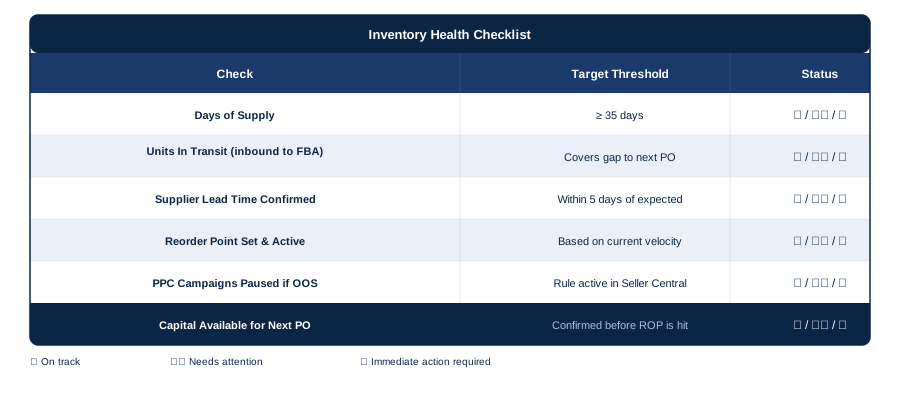
Capital availability is where most stockouts originate at scale. It’s also the row most sellers skip in their weekly review.
The Root Cause Most Sellers Don’t Talk About: Cash Flow
Here’s the uncomfortable reality about Amazon FBA out of stock events at scale: most aren’t caused by bad forecasting. They’re caused by capital timing.
The seller knows exactly when to reorder. They have the velocity data, the lead time, and the reorder point formula. But the cash from their last sales cycle is still locked in Amazon’s 7–14 day remittance window, tied up in a previous shipment, or just short of the supplier’s minimum order quantity.
So they wait. And while they wait, Days of Supply slides below 28, the LIVE fee kicks in, the listing goes out of stock, and a product that took months to rank drops from the top positions.
IHL Group’s 2023 report found that inventory distortion, including stockouts, cost retailers $1.77 trillion globally, equivalent to 7.2% of all retail sales. A significant portion of this is working capital constraints that prevent timely replenishment.
This is the gap that CrediLinq is built to close. CrediLinq provides fast, flexible credit lines of up to $2M to ecommerce sellers, designed specifically for the inventory cycles and cash flow realities of marketplace selling.
There’s no lengthy bank application. Sellers upload their bank statements or connect their Plaid account, and they also connect their store data (Amazon, TikTok Shop, Shopify, Walmart, Lazada, eBay, Shopee, and more), and CrediLinq approves based on actual sales history and store performance, typically as fast as one business day.
For an ecommerce seller, that means your reorder point triggers a purchase order, not a cash flow decision. Your ranking stays intact. Your organic momentum keeps compounding. And your next growth cycle doesn’t get set back weeks by an avoidable inventory gap.
|
What to Look for in Inventory Financing When evaluating working capital options for inventory replenishment, high-volume ecommerce sellers should prioritise:
• Speed of approval: inventory decisions can’t wait weeks for bank processing • Flexible repayment: Repay in 3-6 months in fixed monthly instalments • No equity dilution: funding shouldn’t cost you ownership • Marketplace-native underwriting: your store performance should qualify you, not your personal credit score CrediLinq offers all four, with flexible credit lines up to $2M and approval in as fast as one business day for eligible sellers. With CrediLinq, you get complete peace of mind since the charges are fully transparent – a single fixed service fee starting from 1.5% per month or a simple annual percentage rate of 18% on the amount drawn.
Furthermore, you withdraw as needed and only pay for what you use – without losing equity or needing collateral. |

Ranking Defense Checklist: If a Stockout Is Unavoidable
Even with the best planning, disruptions happen: a supplier delay, a port backlog, an unexpected demand spike. If you’re approaching a stockout you can’t prevent, these steps limit the ranking damage.
Before inventory hits zero:
- Set a campaign pause rule in Seller Central or your PPC tool. Otherwise, you’re paying for clicks that cannot convert
- Raise your price 5–10% to slow velocity and extend your remaining Days of Supply; monitor Buy Box impact carefully
- Contact your supplier and freight forwarder about expedited options; air freight is almost always cheaper than a full ranking recovery campaign
When you restock:
- Reactivate PPC immediately at 20–30% higher daily budgets for the first two to three weeks to accelerate velocity recovery
- Run a Lightning Deal or Coupon in the first week back to create a sales spike and signal recovery to the algorithm
- Track keyword ranks separately from BSR — both matter but recover on different timelines and need different actions
- Watch your review velocity; stockout windows can attract hijackers whose defective inventory damages your star rating
Conclusion
The data is clear. A two-week stockout can take two months to fully recover from. The ranking you lose is the compounding return on every dollar invested in that listing: ad spend, review acquisition, listing optimisation, and time. When it drops, all of that investment underperforms until it comes back.
At $1M+ in annual revenue, you’re not just running a store. You’re managing a portfolio of ranking assets, each with its own organic momentum, competitive position, and reinvestment cycle. Protecting those assets means treating inventory not as a cost centre, but as the mechanism through which all your other investments pay off.
Get your formulas in place. Set your reorder points. Run the weekly risk assessment. And if cash flow timing is the bottleneck between your inventory plan and execution, address that directly — before the next stockout addresses it for you.
Key Takeaways
- A stockout destroys your sales and damages your ranking; loses you customers permanently, and triggers a costly rebuild that outlasts the actual outage by weeks or months.
- The true cost of a 10-day stockout on a single mid-volume SKU can exceed $18,000 once you factor in direct margin loss, PPC recovery spend, and customer churn. Most sellers only count the first.
- Amazon penalises low inventory before you even hit zero: keep Days of Supply above 35 days to stay clear of both the Low-Inventory-Level Fee and stockout risk.
- Ranking recovery takes 2–8 weeks depending on stockout duration; BSR and keyword rank recover on different timelines, so track both separately after restocking.
- Stockouts at scale can be a cash flow problem; solving your capital timing is the fastest, most direct path to protecting your inventory and your ranking.

Frequently Asked Questions
How long does it take to recover Amazon rankings after a stockout?
Recovery time depends on how long you were out of stock. A 1–3 day stockout typically recovers in 3–7 days with normal sales velocity. A 4–10 day stockout can take 2–4 weeks with increased PPC. A 10–30 day stockout may require 4–8 weeks and a deliberate relaunch strategy. For stockouts lasting longer than 30 days, treat the listing as effectively new; rebuilding can take 2–6 months.
Does going out of stock directly hurt your Amazon ranking?
Yes, significantly. Amazon’s A9/A10 algorithm uses sales velocity as a primary ranking signal. When a product goes out of stock, velocity drops to zero and Best Seller Rank degrades rapidly, often by hundreds or thousands of positions within 48–72 hours. Organic keyword rankings also drop as the algorithm interprets the listing as unreliable, and ranking damage typically persists well beyond the restock date.
What is the Amazon Low-Inventory-Level Fee and how do I avoid it?
Introduced on April 1, 2024, the Low-Inventory-Level Fee applies to standard-size FBA products when both the 30-day and 90-day historical days of supply fall below 28 days. Fees range from $0.32 to $0.70 per unit depending on product size and time of year, applied per unit sold during the low-stock period. To avoid it, maintain at least 35 days of supply as a working buffer and set reorder alerts before you drop below that threshold.
How do I calculate my reorder point for Amazon FBA?
Use this formula: ROP = (Average Daily Sales Velocity × Total Lead Time in Days) + Safety Stock. Lead time should include production, ocean or air freight, and Amazon’s FBA check-in time (which can add 1–2 weeks). When your FBA inventory hits the reorder point, place a purchase order immediately — don’t wait for Amazon’s low-stock alert.
Can inventory financing help prevent Amazon stockouts?
Yes, and it addresses the actual root cause for most high-volume sellers. Most stockouts happen because sellers know they need to reorder but can’t access capital fast enough, with cash tied up in Amazon’s remittance cycle or a previous shipment. Solutions like CrediLinq provide ecommerce sellers with flexible credit lines up to $2M, approved in under one business day based on store performance data, so your reorder point triggers a purchase order, not a wait-and-see cash flow decision.